
GA4 Monthly Report Template
A ready-made Google Sheet for monthly GA4 reporting, with KPIs, channels, campaigns, landing pages, targets and charts that update themselves.
This is a Google Sheet you copy into your own Drive. I can’t see your copy or anything you add to it.
What’s inside
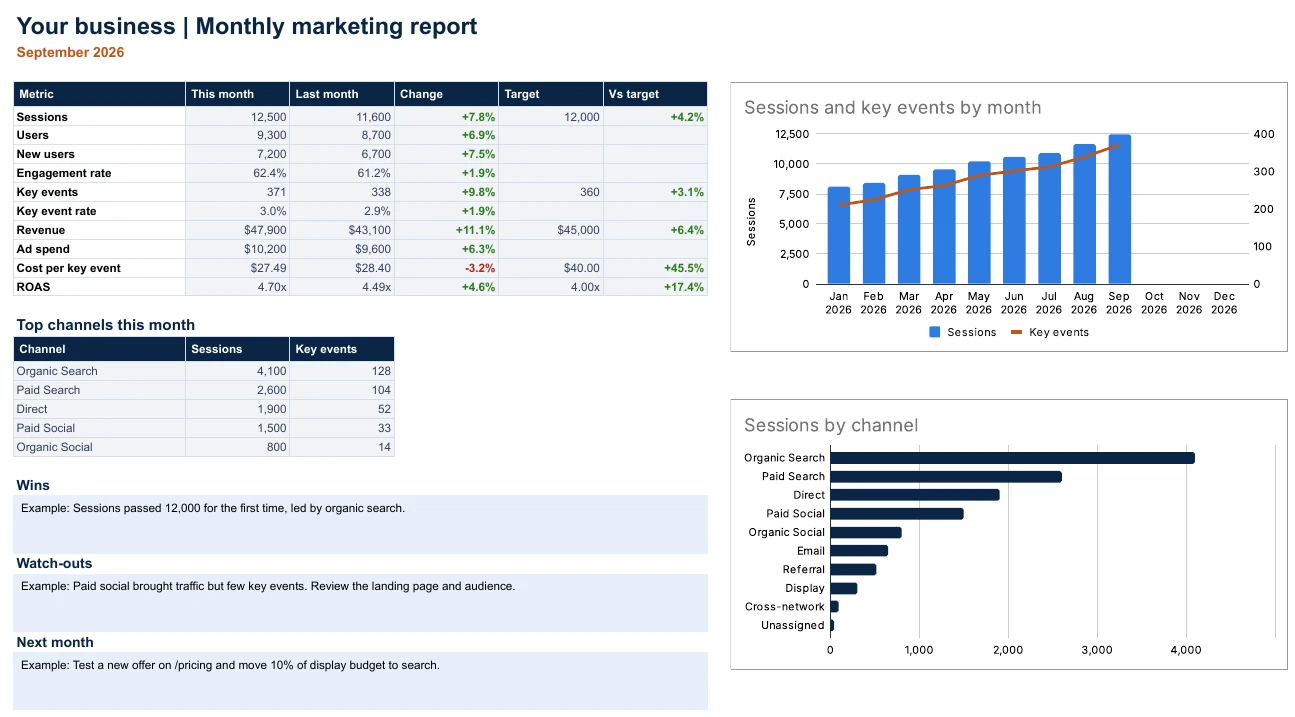
- SummaryThis month, last month, the change and your targets side by side, with two charts and space for wins, watch-outs and next steps.
- SettingsBusiness name, report month and monthly targets. Change the month and the whole report follows.
- Monthly KPIsSessions, users, engaged sessions, key events, revenue and ad spend for each month, with rates, ROAS and month-on-month change worked out for you.
- ChannelsResults for each GA4 default channel group, with share of sessions and revenue.
- CampaignsUp to 25 campaigns with key event rate, cost per key event and ROAS.
- Landing pagesYour top landing pages, with engagement rate and key event rate.
How to use it
- Copy the template, then set your business name, report month and targets on the Settings tab.
- Fill in the blue cells from GA4. The Start here tab shows exactly which report each number comes from. Hover over a header for help.
- Open the Summary, add your wins, watch-outs and next steps, then share it or download it as a PDF.
“Key events” are what GA4 used to call conversions. Ad spend comes from your ad platforms, unless they’re linked to GA4.
Want help putting this to work? Let's talk.
Book a free 15-minute call and we’ll look at where your marketing can grow fastest.
Book a free strategy call